Notepadia
Notepadia is a keyboard-first text editor that reproduces the
Notepad++ user experience — its menus,
shortcuts, editing behavior and window surface — on
Eclipse Theia + Monaco, without reproducing the
Notepad++ implementation. It is browser-first (http://localhost:3000) and
also packaged as a native desktop application via Electron.
It is not a port, fork or plugin host for Notepad++ and uses no Notepad++ code. See About & goals for what that distinction means, what is in and out of scope, and how the docs are organized.
The product is organized as a monorepo:
applications/browser— the web development target, served athttp://localhost:3000.applications/electron— the native desktop target (Electron + electron-builder): NSIS/portable installers on Windows, AppImage/RPM/DEB on Linux, DMG on macOS.extensions/notepadia— the product extension. All Notepad++-style behavior lives here and is shared by both application targets.
Highlights
- A Notepad++-style menu layout:
Search,Encoding,Language,Settingsmenus plus Npp-styleFile/Editsections. - One modeless, tabbed Find dialog (Find / Replace / Find in Files / Mark) behind Ctrl+F, Ctrl+H, Ctrl+Shift+F and Ctrl+M, replacing Monaco's inline find widget, with the Find in Files tab driving workspace search and the Mark tab providing the five Notepad++ mark styles.
- A Search Results window behind F7 (plus F4/Shift+F4 stepping) that keeps the hits of every Find All and Find-in-Files run.
- An Incremental Search bar behind Ctrl+Alt+I: live per-keystroke jumping
with wrap-around, Enter/Shift+Enter stepping, a red-and-announced
no matchstate, and Escape restoring the caret unless a jump was accepted. - Notepad++-style shortcuts: Ctrl+D (duplicate line), Ctrl+L (delete line), Ctrl+F2 bookmarks, and more.
- Browser-proof shortcuts: the chords a browser claims (
Ctrl+N,Ctrl+W,Ctrl+Shift+W,Ctrl+O,F5,Ctrl+F5) keep working in the desktop app and gain alternates on the web (Ctrl+Alt+N,Ctrl+F4,Ctrl+Alt+Shift+W,Ctrl+Alt+O,Ctrl+Alt+D,Ctrl+Alt+Shift+D); editor zoom keepsCtrl+=/Ctrl+-/Ctrl+0to the text while the editor has focus and leaves page zoom to the browser elsewhere;Settings ▸ Shortcut Mapperlists and rebinds every chord. - The clipboard and selection half of the Edit menu: Copy to Clipboard (path, filename, folder), Paste Special (indent, unindent, unformatted), Insert ▸ Date & Time with a token-based customized box, Select ▸ Begin/End Select and Multi-Select All, Line Operations ▸ Column Mode, and a Clipboard History panel of the session's last 20 copies.
File ▸ Set/Clear Read-Only: the document refuses edits, the tab shows the padlock and the status bar readsRead-Onlyinstead ofINS/OVR.- Encoding conversion (UTF-8, UTF-8 BOM, UTF-16 LE/BE, ANSI, ISO-8859 family).
- EOL conversion (LF / CRLF) with live status-bar display.
- A Notepad++ default behavior profile: on a cold profile the editor starts
with word wrap off, 4-wide real tabs, no auto-closing brackets/suggestions,
formatting off, and Notepad++-style
new 1,new 2, ... plaintext untitled documents. - Bookmarks with gutter glyphs and next/previous navigation, plus a Document Map (persistent, preference-backed minimap) for the editor.
- The complete Notepad++ View menu: a Show Symbol submenu (space/tab,
end-of-line
¶, indent guides) driven by Monaco preferences, Fold All / Unfold All / Fold Level 1-7 (Alt+0/Alt+Shift+0/Alt+1-Alt+7), a two-pane Clone / Move to Other View split with Synchronize Vertical / Horizontal Scrolling, Full Screen (F11) and Post-It (F12) distraction-free mode, and Summary... document statistics. - Notepad++'s Window menu: the first ten open documents numbered from one
and renumbered as tabs change, and Windows..., a multi-select
Name/Path/Typelist with Activate / Save / Close / Sort. - Notepad++'s Run menu: Run... expands the
$(FULL_CURRENT_PATH),$(FILE_NAME),$(CURRENT_DIRECTORY),$(CURRENT_WORD)and other run variables, openshttp/httpscommands in a new tab, and says so plainly when a command needs the desktop build (where it does launch, behind a preference that is off by default). Named commands are listed in the menu and managed through Modify Shortcut/Delete Command.... - A full Notepad++ status bar — length/lines,
Ln / Col / Pos, selection, encoding, EOL, indent mode and anINS/OVRindicator — with a real overtype mode toggled by theInsertkey. - Curated
Languagemenu with lightweight Monarch tokenizers. - A Notepad++-style 26px toolbar under the menu bar (file, print, clipboard, undo/redo, search, zoom, view toggles, macros) with keyboard navigation.
- Notepadia Classic light/dark themes and a Notepad++ window surface (no activity bar, no right-hand panel, no breadcrumbs).
- A Notepad++-style tab bar: red/blue floppy saved-dirty icons and a padlock for read-only tabs, the Notepad++ right-click tab menu, and middle-click to close.
- Recent files with session persistence.
- The four file commands Notepad++ users expect:
Reload from Disk,Save a Copy As...(a copy that leaves the tab on the original file),Rename...(moves the file and keeps the tab on it, carrying unsaved text across) andDelete from Disk(always confirmed, closes the tab), plusOpen Folder as Workspace...in theFilemenu. Openmeans your own disk, everywhere: theFilemenu entry, the toolbar's Open button andCtrl+Oare one command labeledOpen from Computer, and the server workspace keeps its own differently named entry,Open from Workspace....Save To This Computer...andUpload to Workspace...are the bridges between the two, so it is always clear which disk a command touches. On Chromium, a file opened from your disk keeps its handle and Ctrl+S writes back to that same file.- Automatic updates over GitHub Releases (desktop app).
- Unsaved work survives a crash: a copy of every document with unsaved changes
is kept in the browser's own storage a few seconds after you stop typing, and
restored the next time you open Notepadia. Saving or discarding clears the
copy, a file that changed on disk in the meantime is never overwritten, and
notepadia.backup.enabled/notepadia.backup.intervalSecondscontrol it.
Screenshots
The browser build, as it actually runs (captured from a real session by
scripts/capture-docs-screenshots.mjs):
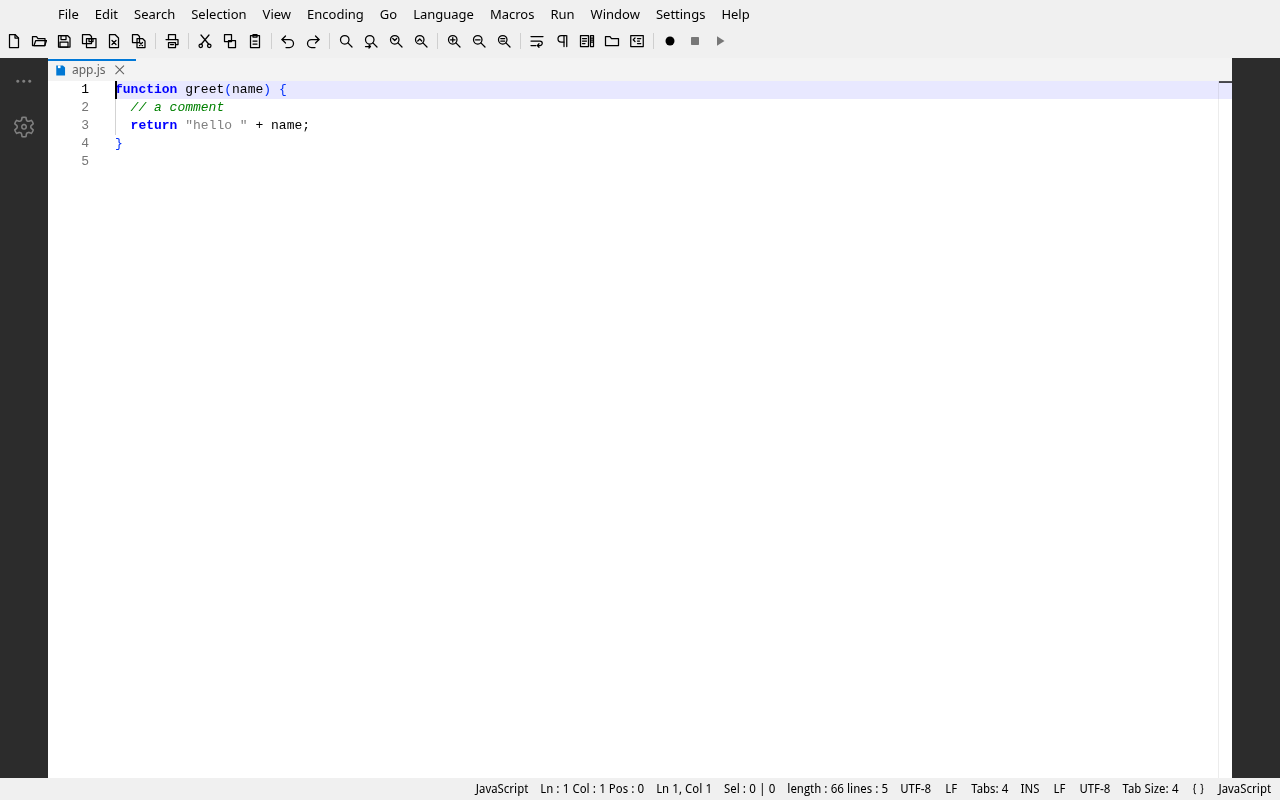
The editor — Notepad++'s shell: menu bar, toolbar, tab bar with the floppy saved icon, and the full status bar showing the language, EOL and indent mode:
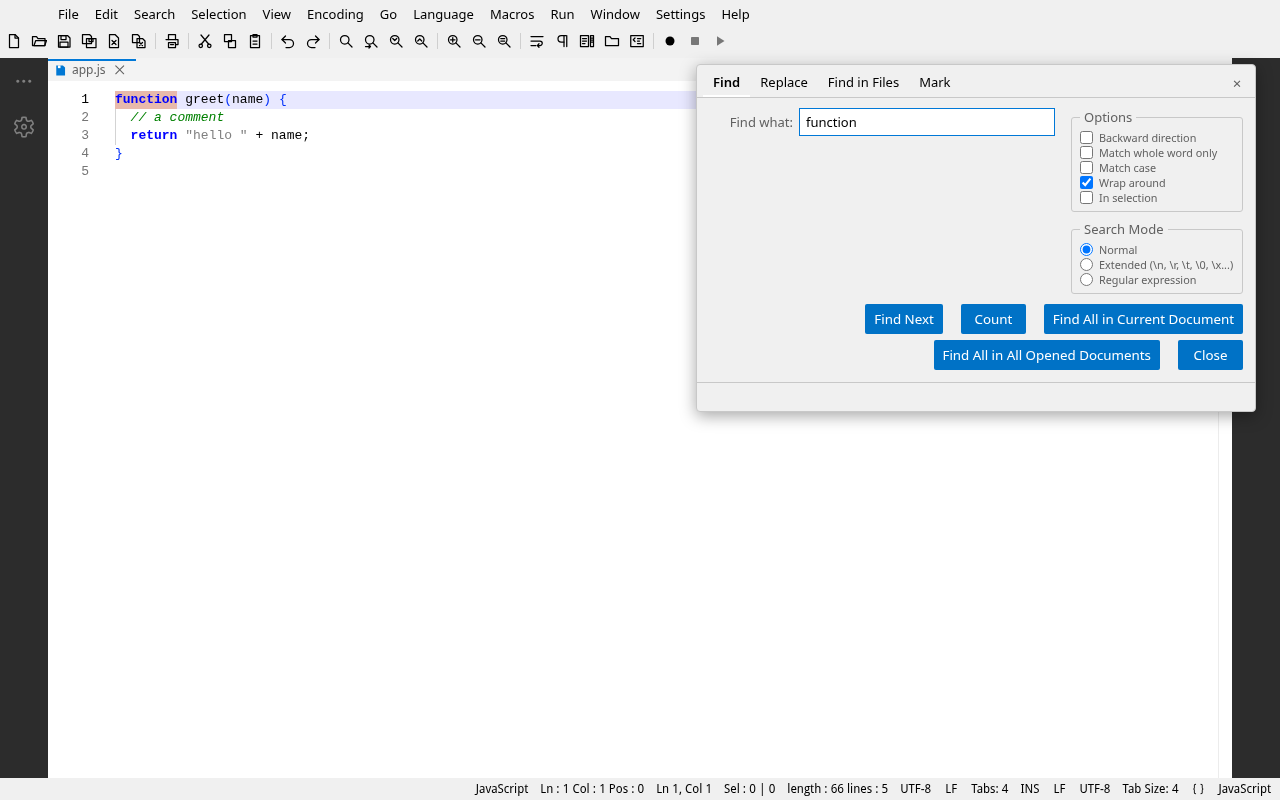
The Find dialog — one modeless dialog with Find, Replace, Find in Files
and Mark tabs, opened by Ctrl+F:
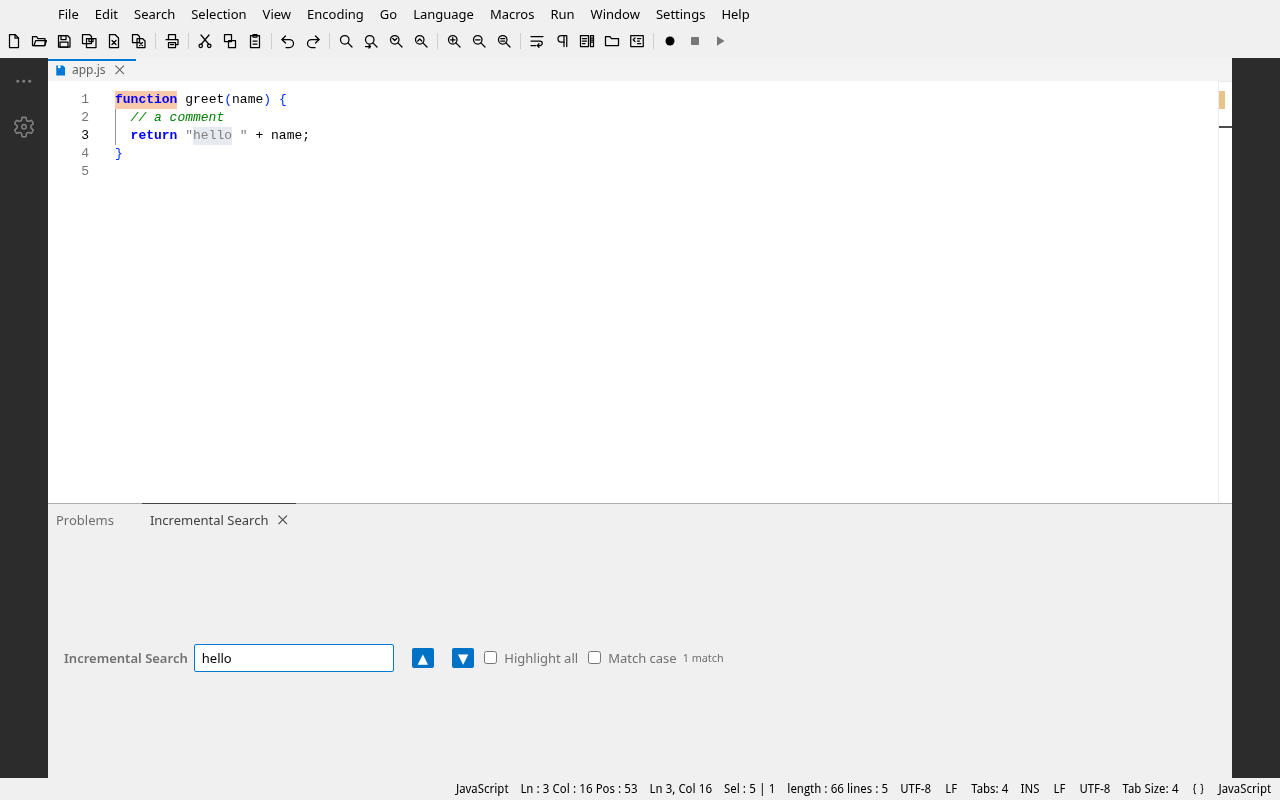
Incremental Search — the Ctrl+Alt+I bar at the foot of the editor,
searching live from the caret:
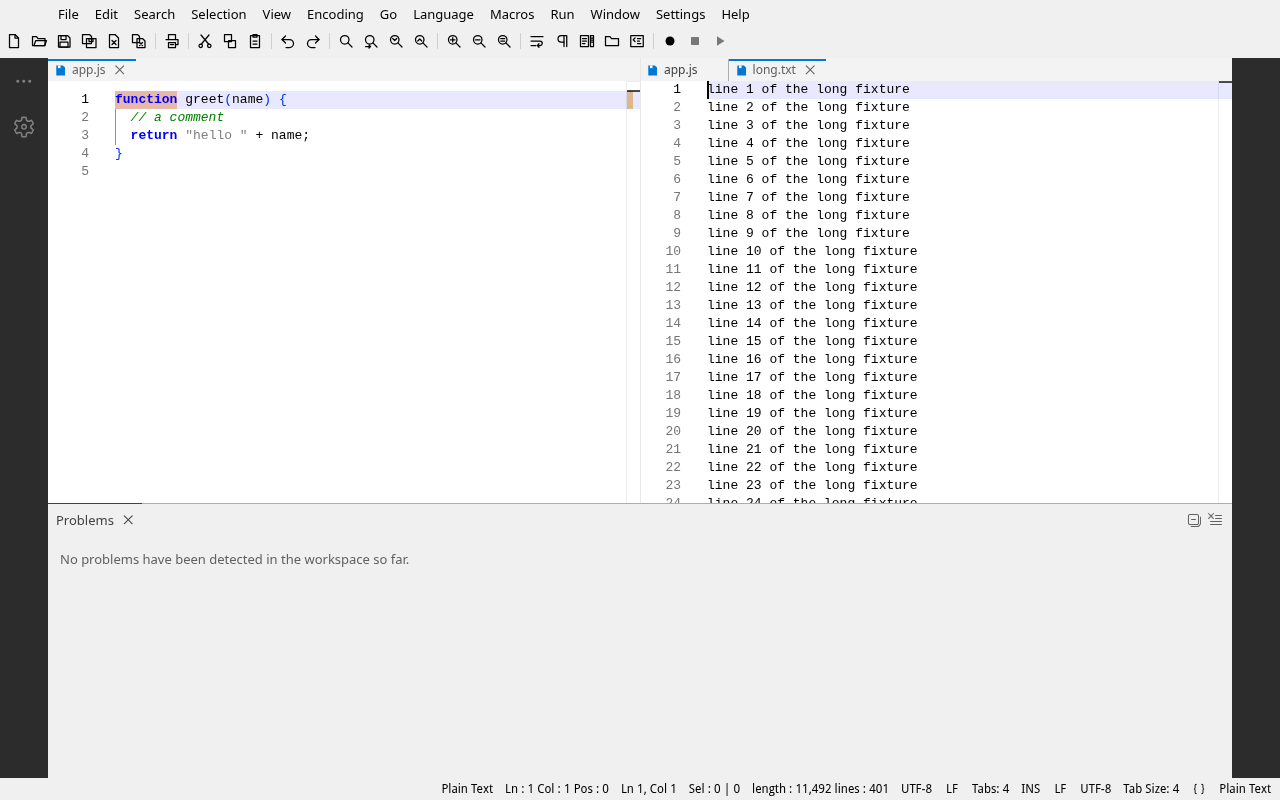
Two-pane split — View ▸ Move to Other View with synchronized scrolling,
the way Notepad++ splits a document:
Project status
Notepadia has completed the Notepad++-experience program (workstreams A–F plus verification tasks G1–G3 and G5) and shipped its first tagged release, 2026.10.10. The remaining open item is G4, the demonstration that an installed desktop build upgrades itself from a published release.
The full milestone history, the workstream status table and the definition of done live on the Roadmap page.
See About & goals for what "Notepad++ experience, not implementation" means, Architecture for the internal design, Accessibility for keyboard and screen reader support, and Releases & updates for how new builds reach users.